
A nested bundle is a bundle that sits inside another bundle as one line. Use it when the same group of items shows up in several offers, like a glassware set or a mixers kit. Build it once, reuse it everywhere, and when the glassware price changes you fix it in exactly one place.
Before you start
The + Bundle button stays greyed out until there's a bundle to pick from. When you're creating a new bundle, one existing bundle is enough. When you're editing an existing bundle, you need at least one other bundle, because a bundle never appears in its own list.
Steps
- Open Bundles. It's under Settings, then Libraries, and it's also in the Libraries group in the sidebar.
- Build the inner bundle first. Click New bundle, name it, add its items, set its pricing, and click Save. This is the child.
- Open the bundle that should hold it. Click its row, use the pencil icon, or click Edit bundle in the detail pane. This is the parent.
- Go to the Items section.
- Click + Bundle. A new line appears at the top of the list.
- Open the Select bundle list and pick the child. Each choice shows how many items it holds and a few of their names. You can type to search, and searching for an ingredient finds the bundles that contain it.
- Check the line. It reads nested bundle with a note like "Includes 8 items", sampled at the guest count and hours shown on the screen.
- Save. On a bundle you're creating, click Save. On an existing bundle, changes save as you type, so click Done when you finish.
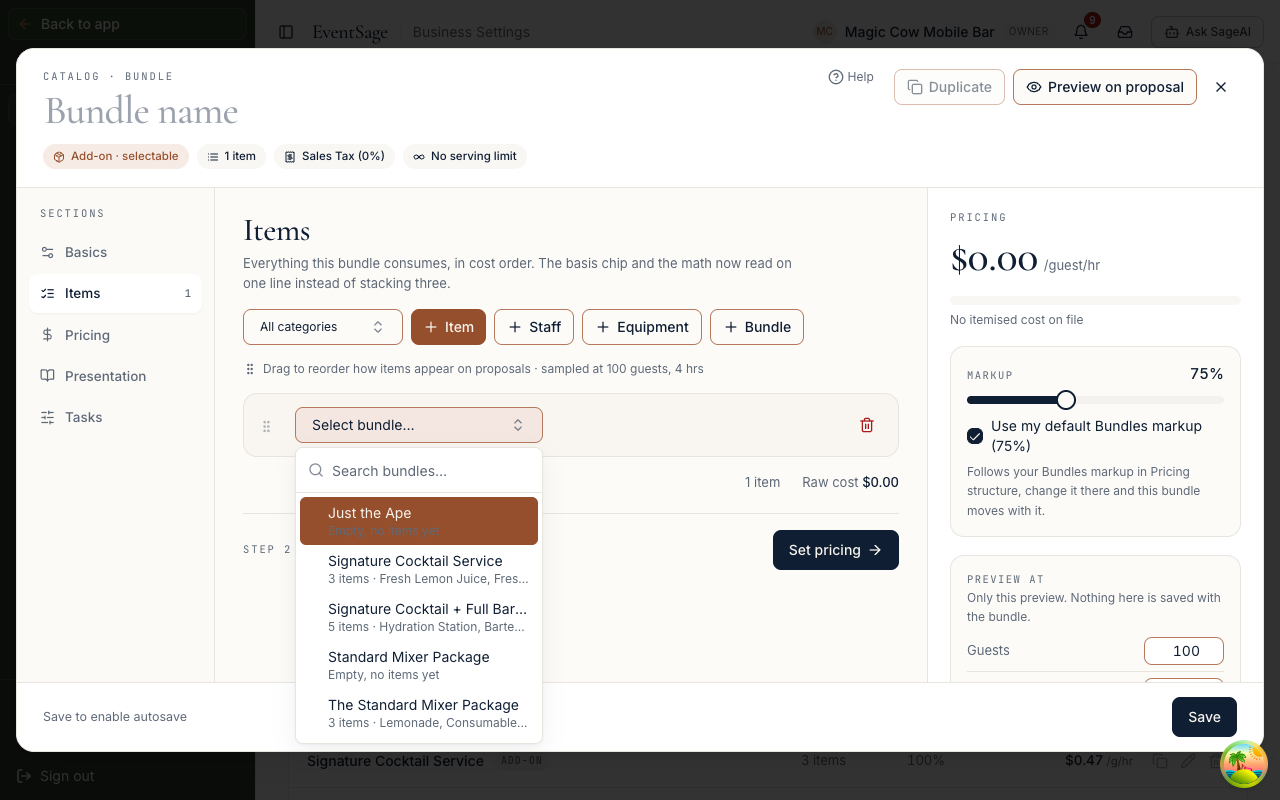
What the parent's price includes
The parent's cost includes everything inside the child, and the cost panel updates the moment you pick it. Staff lines inside the child count toward the parent too, at any depth.
A nested line has no basis or quantity to set. It brings the child along as it is, and the child keeps its own pricing rules.
Limits to know
- A bundle can be nested once per parent. After you add a child, it drops out of that parent's list.
- A bundle is counted once inside a bundle's own cost. If the same child appears twice under one parent, the second one adds nothing.
- A child nested only inside parents priced as a Flat fee keeps its own full price line on the quote, because those parents never charge for what they hold.
- A parent priced as a Flat fee charges its own fee and doesn't add the child's cost on top.
- Archived bundles don't appear in the list.
- The editor won't stop two bundles from nesting each other, so please don't put bundle A inside bundle B and B inside A. The price counts the repeat as zero, which hides the mistake instead of flagging it.
To change what's inside a nested bundle, open the child itself and edit it there. Every parent that holds it picks up the change.